
Your public profile
Your profile page is two things at once: the settings for your own account, and the source of what clients see when they look you up.
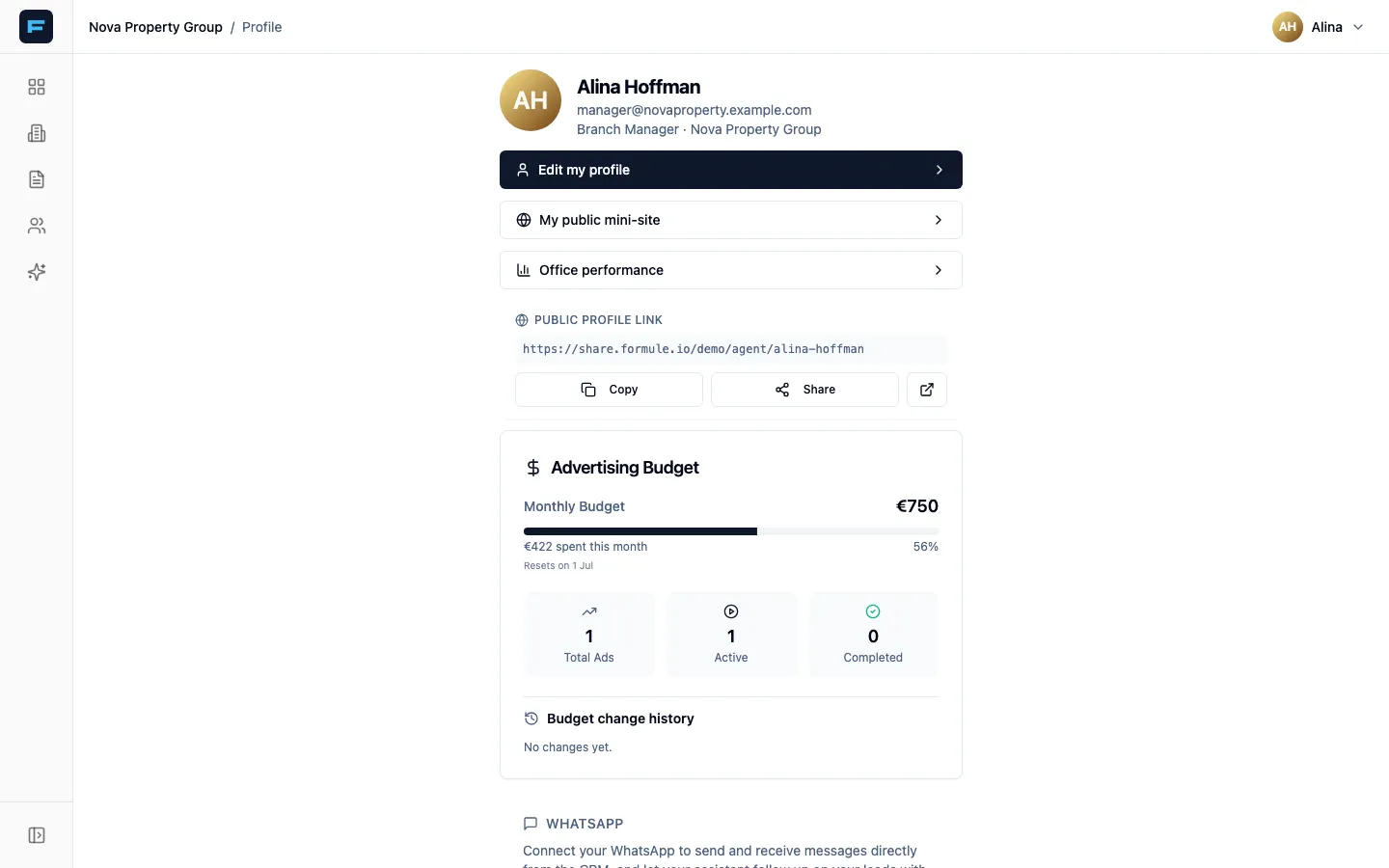
Reach it from your name at the top right, then Profile.
What is on it
Section titled “What is on it”- Edit my profile — your agent profile: photo, bio, contact details, and the switch that makes you public.
- My public mini-site — your personal page, covered below.
- Office performance — agency-wide reporting. Branch managers and super admins only.
- Public Profile Link — appears once your profile is public, with buttons to copy and share it.
- Your assistant — linking Telegram. See The Telegram assistant.
- WhatsApp — connecting your number, if your agency has it enabled.
Going public
Section titled “Going public”-
Press Edit my profile.
-
Fill in the parts a client will actually read: your photo, Bio, Location, Phone, and your social links.
-
Turn on Public Profile — “Enable to allow clients to view your profile and contact you.”
-
Press Save Changes.
A Your Public Profile card then appears with your address and a button to open it.
Your mini-site
Section titled “Your mini-site”The mini-site is separate from your agency profile: one link that represents you across every conversation, whoever you work for.
Open it from My public mini-site. It has six sections:
- Web address — pick the link clients see, under
app.formule.io/. Then the Public mini-site switch. Some names are reserved by the platform and will be refused. - About you — name, a one-line tagline, bio, where you are based, years of experience.
- Contact — phone, WhatsApp, website.
- Expertise — specialisations, areas covered and languages, each a comma-separated list. Plus Show sold prices, which decides whether your track record shows numbers.
- Awards & credentials — title, who issued it, year.
- Client reviews — reviews arrive here and stay private until you Approve them. You can also unpublish or delete one.
Press Save when you are done.
Hidden leads
Section titled “Hidden leads”Show my Hidden Leads dashboard lives on your agent profile. Off — the default — leads you hide disappear quietly. On, you get a Hidden Leads dashboard to review and restore them.
Connecting WhatsApp
Section titled “Connecting WhatsApp”If your agency has WhatsApp enabled, your profile carries a WhatsApp card. Connecting lets you send and receive messages from inside Formule, and lets your assistant follow up on leads with you.
-
Tick the consent box — “I understand and I agree to my assistant reading my lead conversations.”
-
On your phone, open WhatsApp → Settings → Linked Devices → Link a Device.
-
Scan the QR code on screen.
You will see WhatsApp connected successfully!. To undo it, press Disconnect. If a setup is interrupted, the card offers Resume Connection or Reset & Start Over.
No agent profile yet?
Section titled “No agent profile yet?”If you are a branch manager, your profile shows Set up your agent profile — press it and Formule creates your agent record.
If you are a plain user, you will see “We couldn’t find your agent record”. Ask your branch manager to link your account.