

Really in the app
Really is Formule’s AI. In the app it is a chat: ask about your leads, your follow-ups and your listings in plain language, and Really looks them up for you. It can also make changes — add a note, move a lead on, set a reminder — but only after you approve each one.
It is the same assistant you can reach on Telegram, with the same tools and the same rules about what it can see.
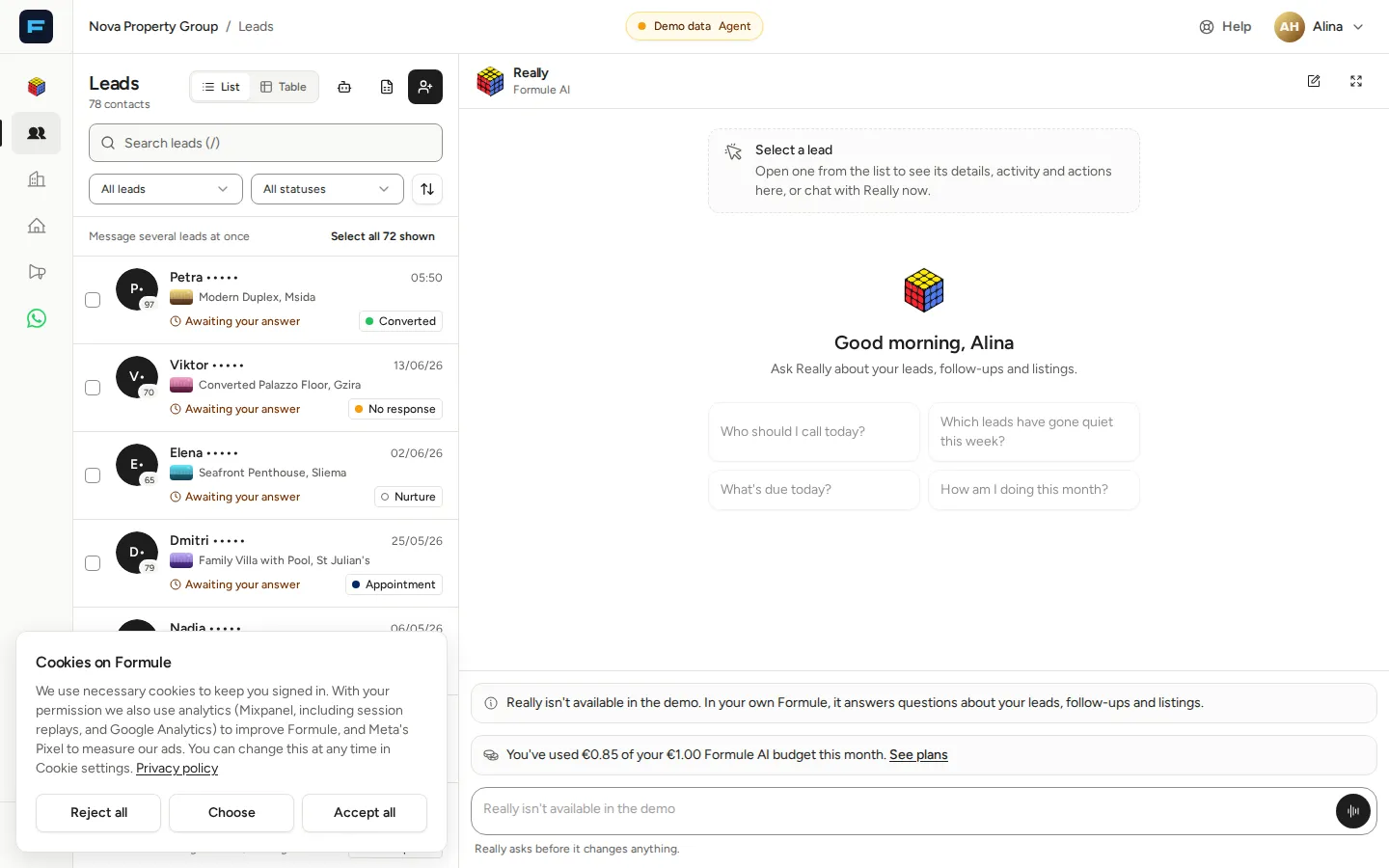
The screenshots on this site come from a demo agency, where Really cannot answer, so its message box is switched off. In your own Formule you type there, or speak with the microphone.
Opening Really
Section titled “Opening Really”There are four ways in:
- On the leads page, while no lead is open, Really is already there on the right: type or speak in its box. Open a lead and it steps aside; close the lead and the same chat is back. ⌘J on a Mac or Ctrl J elsewhere puts the cursor in its box.
- Ask Really, the round button at the bottom right of other screens, opens Really beside whatever you are doing. On a computer, ⌘J or Ctrl J opens and closes it.
- Really in the menu — the speech bubble in the icon rail — opens the full page, with your chats down the left.
- Ask Really on a lead’s page starts a new chat about that lead. See asking about one lead.
On a phone, Ask Really sits just above the tabs and opens Really full screen.
If you signed up for Formule on your own, Really is your home: Formule opens on the full Really page.
Asking a question
Section titled “Asking a question”Type in the box that reads Ask Really… and press Enter. Shift+Enter starts a new line. A message can be up to 4,000 characters.
A new chat offers four questions to start from:
- Who should I call today?
- Which leads have gone quiet this week?
- What’s due today?
- How am I doing this month?
While it works, Really shows what it is doing — Looking through your leads, for example — and the answer appears as it is written. To cut an answer short, press the square Stop the answer button where Send was.
Useful things to type:
What’s the number for the couple asking about the riverside loft?
Which of my leads match the new two-bed in the centre?
Show me everything on Rania Novak and tell me what I promised her.
Set Adrian Keller to Appointment and remind me Friday morning.
Asking about one lead
Section titled “Asking about one lead”On a lead’s own page — on a phone, the screen you get when you tap a lead — press Ask Really, next to the lead’s status.
Really opens on a new chat, and the message box is labelled About and the lead’s name. Your next message is about that lead, so “When did we last speak?” is enough. Press the × on the label to ask about something else instead.
In the desktop workspace, where a lead opens beside the list, simply name the lead in your question.
Really asks before it changes anything
Section titled “Really asks before it changes anything”Looking things up needs no approval. Anything that changes your data waits for you: Really shows a card saying exactly what it will do — which lead, the new status, the text of the note or the message — and two buttons.
- Approve carries it out once, exactly as the card shows.
- Cancel drops it.
The card then says how it went: Done, Cancelled or Didn’t go through. A card you leave unanswered expires when you send another message, or after 30 minutes, and then reads Expired, so an old request can never run later by surprise.
If a card reads Didn’t go through, check the lead in Formule before you ask again. Usually nothing changed, but if the connection dropped while the change was running it may have gone through — for a WhatsApp message, look at the chat first so the client does not get it twice.
This is what Really can change, always through a card:
- add a note to a lead, or change its status;
- schedule a follow-up, or mark one done;
- mark a matched property as shown, sent or dismissed;
- dismiss or snooze a suggestion;
- send a WhatsApp message to a lead from your own number, once you have connected WhatsApp. The card shows the exact text and the follow-up reminder it will set — in three days, unless you ask for another — and nothing is sent until you approve it.
Your chats
Section titled “Your chats”Every conversation is saved, and your chats are visible only to you: nobody else in your agency, your manager included, can open them. A chat is named after its first message.
- New chat starts afresh. In the side panel it is the pencil at the top.
- Recent chats lists your 50 most recent chats, newest first. On the full page they run down the left; in the side panel, and on a phone, press the clock — Your chats — to see them.
- To rename or delete a chat, press … beside it and choose Rename or Delete. Deleting asks first, and removes the chat and every message in it for good.
The side panel and the full page show the same chat. Really in the menu opens the one you were last in, and on a computer the arrows in the panel’s header move the chat you are in onto the full page.
How much you can ask
Section titled “How much you can ask”How much you can ask depends on your plan: a number of messages a day, and a monthly Formule AI budget.
- If you reach the day’s limit, Really tells you; the allowance resets at midnight in your agency’s time zone.
- If this month’s AI budget runs out, Really says so; it resets at the start of next month. Plan & billing, under your name at the top right, shows the plans with more.
- Speaking to Really comes with the Really and Pro plans, the free trial and agency plans. On the free plan you type.
Sending many messages in a few seconds also makes Really ask you to wait a minute.
Who has Really
Section titled “Who has Really”Everyone signed in to an agency, except accounts that are only a finance admin or only an advertiser. Those roles do not get the leads workspace either, and Really is a leads assistant. See Roles.
Really in the app and on Telegram
Section titled “Really in the app and on Telegram”They are the same assistant, but for now each keeps its own history: a conversation on Telegram does not appear in the app, and the other way round. To talk to Really from your phone without opening Formule, link the Telegram assistant.
When it does not answer
Section titled “When it does not answer”- “Really is taking a short break.” Really has been paused for a moment. Try again a little later.
- “Really can only work in agencies you belong to.” The agency on screen, or the agency this chat was started in, is not one you belong to — a chat from an agency you have since left, for example. Switch to one of your own agencies and start a new chat.
- “I’m still working on your last message in this chat.” The chat is still answering, perhaps in another tab or window. Wait a moment, then send again.
- Your question reappears in the message box. Really could not take it: you sent several messages within a minute, the chat was still busy, Really was paused, the connection dropped, or you reached the day’s limit. Nothing is lost. The note in the chat says what happened, and when you can ask again if there is a wait.
- “Couldn’t load your chats.” Press Try again.
- “This chat isn’t available” — it was deleted, or the link is not one of your chats. Press Start a new chat.
- There is no Ask Really button. It is not offered on public pages, or on the Really page itself, which already is the chat. If it is missing everywhere, check your role above.
More in Troubleshooting.
Other ways to use Formule’s AI
Section titled “Other ways to use Formule’s AI”- The Telegram assistant — Really in your pocket, without opening the app.
- Connecting ChatGPT and Connecting Claude — use your own AI assistant with your Formule data, under the same permissions.